

STIG Viewer opens one checklist. STIGrevolution works the whole set.
Bulk operations across hundreds of checklists, analysis and reporting across all of them at once, and your eMASS POA&M and Assessment Procedure results kept in step with your testing.
Two-week free trial. Windows.
The problem
A server carries a dozen checklists. A package carries hundreds.
At that volume the standard tools stop being slow and start being the reason things go wrong.
You create checklists from SCAP results one at a time. You hunt for “Not Reviewed” items across hundreds of files with no way to see them at once. You correct host information one checklist at a time. And when a new STIG version drops, you find out which of your checklists went stale by opening them.
So people build their own way through: spreadsheets, PowerShell, Python. It works, right up until it doesn’t. It doesn’t scale past a certain point, it only runs if the person who wrote it is still there, and it can’t be turned into a process you could hand to anyone else.
STIGrevolution started the same way: written by people doing this work, for the packages in front of them. The difference is that it was built to be handed to anyone.
At scale
Bulk operations that actually scale
Create checklists from SCAP output in bulk
50 SCAP results become 50 checklists in one operation, not 50.
Migrate to new STIG versions in bulk
When a quarter’s revisions land, update every affected checklist at once instead of discovering them one file at a time.
Edit across assets
Set status, finding details, and comments for multiple assets in a single pass.
Duplicate against hostname and IP lists
Stand up checklists for a whole set of systems from a list you already have.
Already using STIGreviewer?
It’s our free STIG Viewer replacement, and it edits and validates checklists one at a time. STIGrevolution does that work in bulk, across every checklist at once, and adds the reporting and eMASS layer on top: analysis across the whole set, POA&M updates generated from your results, and the Assessment Procedure (AP) results that go with them.
Prove it
Find the problems before a reviewer does
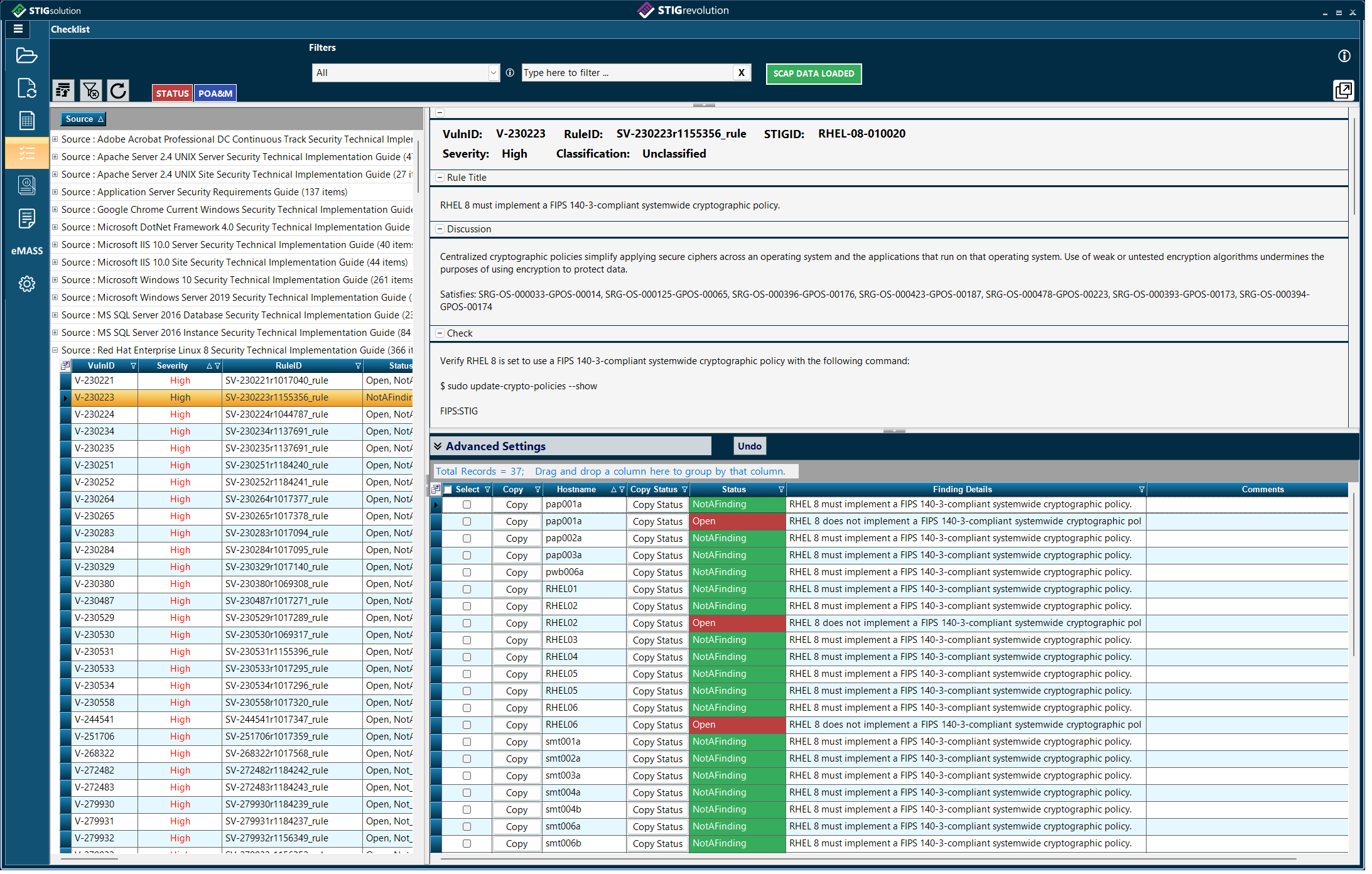
Load your files and STIGrevolution flags the problems straight away: missing host information, items still Not Reviewed, items closed with no finding details. You see every issue up front, across the whole set, and correct it before anything is built on top.
Review interface
Check and correct host information, surface every “Not Reviewed” item, and find items closed with no finding details, across the whole set rather than file by file.
Analysis
Sort, filter, and group across every checklist at once, then export the view as a report rather than as raw data you still have to shape.
Compare against your eMASS POA&M
Import the POA&M alongside your CKLs and ACAS files, see where they disagree, and generate the updates.
Assessment Procedures
Assessment Procedure results, written from your actual testing
eMASS holds a result for every Assessment Procedure (AP) and exports them in the TR Export, an Excel spreadsheet you update and upload to change the results in eMASS. STIGrevolution writes those results from the testing you already have loaded, aggregated with policy results you create for each AP.
Pull in every result that answers it
Any loaded result tied to a CCI, AP, or control counts, compliant or not, from STIG checklists and ACAS alike. Add policy results for each AP in a file you create and edit locally, like a checklist, and they aggregate with the rest.
In your order, in your words
Choose the order results are listed in and add text before and after them: the standard wording you’d otherwise paste into hundreds of APs by hand, one at a time.
Written to fit the field
Technical results are aggregated per check: ID, STIG, title, and “12 of 14 hosts compliant.” Each result is capped at 4,000 characters, the size of the eMASS field, and edited down to fit when the full listing won’t.
When eMASS and the POA&M disagree
Load the TR Export beside the POA&M, and STIGrevolution shows every place they’re out of sync, then generates a TR Import: the updated spreadsheet that brings eMASS back in line.
Before you ask
Frequently asked questions
- How is STIGrevolution different from STIGreviewer?
- STIGreviewer is free and edits one checklist at a time. STIGrevolution works in bulk across hundreds of checklists, and runs the package around them: analysis across the whole set, eMASS POA&M updates generated from your results, and Assessment Procedure (AP) results ready to upload to eMASS through the TR Export spreadsheet.
- Does it send my checklist data anywhere?
- No. Checklists stay on your machine. The only outbound connection is the license check over port 443, which carries your license key, a hashed computer ID, and the application version, and picks up proxy settings automatically.
- How long is the free trial?
- 14 days from activation, with no license key needed to start.
- Should I download the EXE or the MSIX?
- They are the same application. The single-file EXE runs without installing; the MSIX is for managed deployment through the tools you already use.
- Does it support the 2026 eMASS POA&M template?
- Yes. Since version 1.0.1.11, POA&M import and export use the new template, and older-format POA&M files still import.
- Can I move my license to another computer?
- Yes. Save your license key, choose Return License in the application, then activate on the new computer with the same key.
- Can I use it on a disconnected or air-gapped network?
- Yes. STIGrevolution is supported on disconnected, classified, and air-gapped networks. It checks its license online every 7 days and keeps working for up to 14 days without a connection, so coordinate with us at mail@stigsolution.com and we will set up licensing for your environment.
- Platform
- Windows 10, 11, Server 2012 R2, 2016, 2019
- Runtime
- .NET Framework 4.7.1 or higher
- Formats
- CKL, CKLB, and policy results files
- Imports
- SCAP output, ACAS files, eMASS POA&M, eMASS TR Export
- Exports
- Excel reports, POA&M updates, eMASS TR Import
- License
- 365 days from date of purchase
Next
What’s coming
The next release of STIGrevolution moves to .NET MAUI, adds macOS, and brings the same baseline module as NESSviewer: your hardware and software list and test plan, shared between the two applications. It enters beta after NESSviewer’s.
Your next package can go in clean
Interested in licensing? Contact us atmail@stigsolution.com. Purchase is subject to the Terms of Use and EULA; see licensing for how activation works.