

Nessus finds the problems. NESSviewer turns them into your package.
Executive summaries, per-asset software lists built from plugin output, port and listener enumeration, and a POA&M generated from the findings, across every scan at once. No spreadsheet work in between: the POA&M exports to Excel, ready to update in eMASS.
Beta: feature-complete, in testing. Windows.
The problem
The spreadsheet works. Until the package is due.
Export to CSV. Pivot. Compare against last quarter’s export to find what’s new. Reconcile the assets that show up under two different names. Hand-build the software list. Copy findings into the POA&M template. Do it again next month.
It works. It’s also the reason nobody can hand this task to anyone else, and the reason the software list stops matching reality about a week after it’s written.
Beyond the spreadsheet
Some of this isn’t just slow in Excel. It’s impossible.
NESSviewer is written by people who review ACAS results themselves. That is how we know exactly where the spreadsheet gives out.
Software lists from plugin output
Nessus reports installed software inside plugin text, not in a column. NESSviewer parses it into a per-asset software inventory. A spreadsheet cannot read a paragraph.
Ports matched to listeners
Port enumeration on its own tells you something is listening on 8443. NESSviewer correlates it against other plugin results to tell you what.
One view across every scan
Aggregate any number of .nessus files with asset identity held consistent, instead of reconciling exports by hand.
Analyze
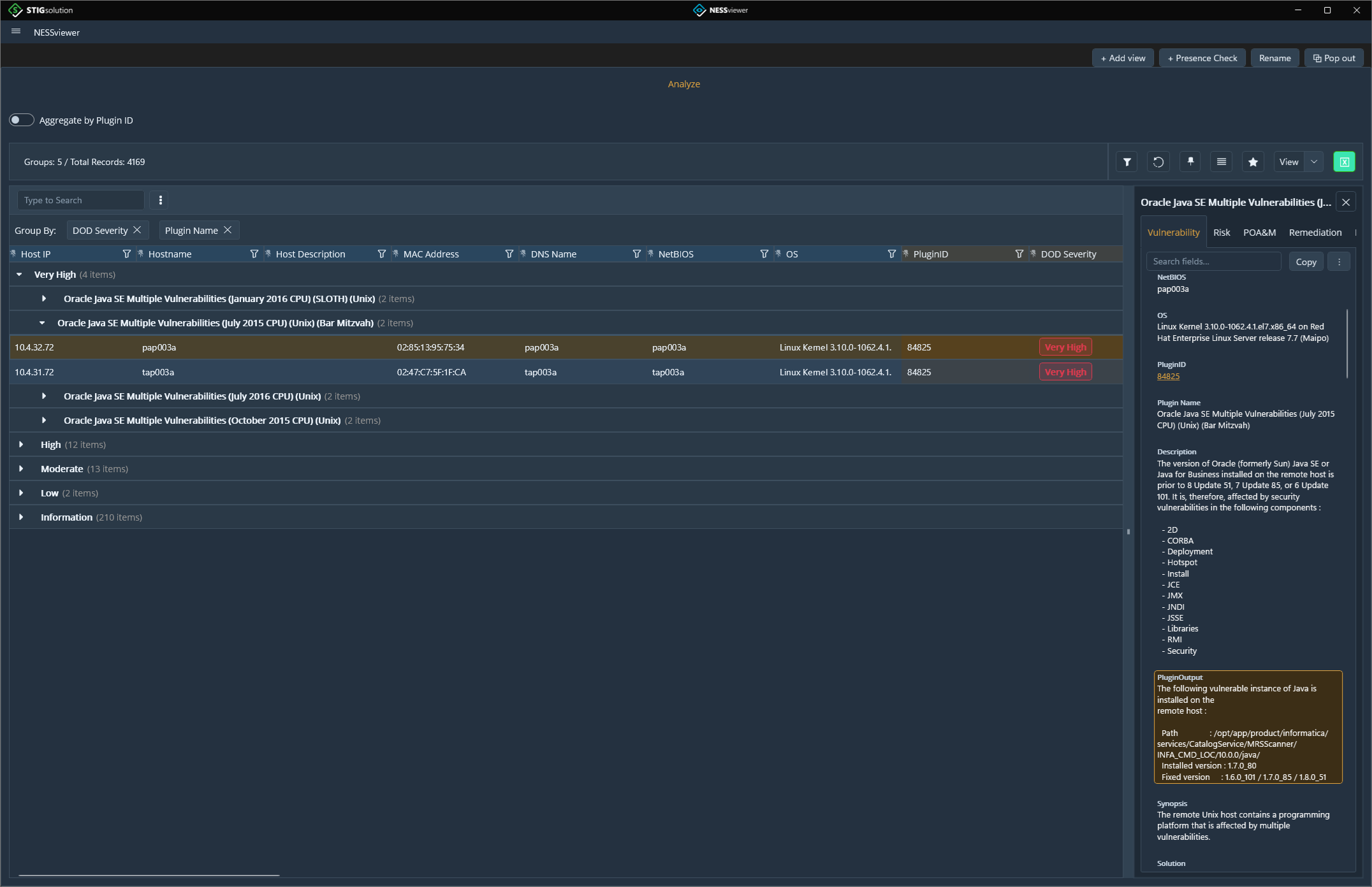
Every finding from every scan, in one grid
The Analyze page pulls every finding from every loaded scan into a single grid, joined to your POA&M and remediation plan: one row per host, plugin, and port, with around sixty columns from host identity through CVSS scoring to POA&M status.
The grid is hierarchical. Group by any column and nest the groups, so thousands of rows become severity, then plugin, then the hosts each one affects. Sort, filter, and search everything at once, open a details panel to read a finding properly, and keep as many saved views as you need: one for triage, another for POA&M work.
Trust the scan
Know what the scan actually saw
A host that fails to authenticate produces almost no findings, which looks exactly like a clean machine. NESSviewer tells the two apart.
Scan Status
Built on the ACAS best practices guide. Every host gets a verdict from the authentication and local-check plugins that fired: Good, Error, Bad, or Suspect, with credentialed and non-credentialed hosts counted separately and a troubleshooting panel that shows why a host failed.
Presence Check
Is the endpoint agent on all 340 servers, or 337? Is prohibited software anywhere in the enclave? Presence Check answers both, and separates “we looked and it isn’t there” from “we couldn’t look,” so an unscanned host never counts as a pass.
Baseline
The same baseline, whichever tool you’re in
The hardware and software list is the artifact everyone maintains by hand and nobody fully trusts. It’s stale the moment it’s written, and there’s no practical way to verify it against the systems.
The NESSviewer beta carries the baseline (the hardware and software list and the test plan) and builds the software list from what the scans actually found. The next STIGrevolution release brings the same module, and the two will share one baseline: scan data on one side, checklist data on the other.
Load it beside your scans and NESSviewer tells you whether you scanned everything in your system: every host is checked against the test plan, so a machine you missed, or one you scanned that was never in scope, stands out. It also shows you where a host’s information has changed since the baseline was written.
So when a reviewer asks whether everything in the baseline was tested, the answer traces back to evidence rather than to a spreadsheet somebody last touched a year ago.
Reporting
Reports you were building by hand
- Detailed Vulnerability List and Plan of Action and Milestones, built from the findings and exportable to Excel.
- Executive summaries (finding totals, aging, and patch status) at the push of a button rather than the end of an afternoon.
- Analysis views you can group, sort, and filter, then export as the report rather than as raw data you still have to shape.
Before you ask
Frequently asked questions
- Does NESSviewer send my scan data anywhere?
- No. Your .nessus files are processed on your machine. The only outbound connection is the license check, which carries your license key, a hashed computer ID, and the application version.
- Do I need a Tenable license to use it?
- NESSviewer reads the .nessus files your Nessus or ACAS scans produce. It does not include or provide any Tenable software, plugin feed, or subscription.
- What is the difference between the beta and the current release?
- The beta is the new NESSviewer, feature-complete and in testing, and it includes the baseline module. The current release is the shipping application without the baseline. Both are available to download.
- How long is the free trial?
- 14 days from activation, with no license key needed to start.
- Can I use it on a disconnected or air-gapped network?
- Yes. NESSviewer is supported on disconnected, classified, and air-gapped networks. It checks its license online every 7 days and keeps working for up to 14 days without a connection, so coordinate with us at mail@stigsolution.com and we will set up licensing for your environment.
- Does it use AI?
- Only if you turn it on. POA&M fill stays hidden until you connect a provider: OpenAI, Azure OpenAI, Claude, or Ollama running on your own machine. Requests go to that provider under your own account, never through us.
- What does it need to run?
- The beta: Windows 10 version 1809 or later, Windows 11, or Windows Server 2019 or later, 64-bit. The current release: Windows 7, 8, 10, or 11, or Windows Server 2012, 2016, 2019, or 2022, with .NET Framework 4.6 or higher.
- Build
- Beta (.NET MAUI)
- Platform
- Windows
- Input
- .nessus files from Tenable Nessus
Current release
Not ready for a beta? The current release is still here.
The shipping NESSviewer: executive summaries, analysis views, software and port lists, and DVL and POA&M reports from .nessus files. It does not include the baseline module, which arrives with the beta.
- Platform
- Windows 7, 8, 10, 11; Server 2012, 2016, 2019, 2022
- Runtime
- .NET Framework 4.6 or higher
- Free trial
- 14 days, no license key required to start
- License
- 365 days from date of purchase
Stop rebuilding the same spreadsheet
Interested in licensing? Contact us atmail@stigsolution.com. Purchase is subject to the Terms of Use and EULA; see licensing for how activation works.