
RMF packages that go in right the first time
Tools that keep your checklists, your scan results, and your eMASS POA&M in agreement, so the package doesn’t come back.
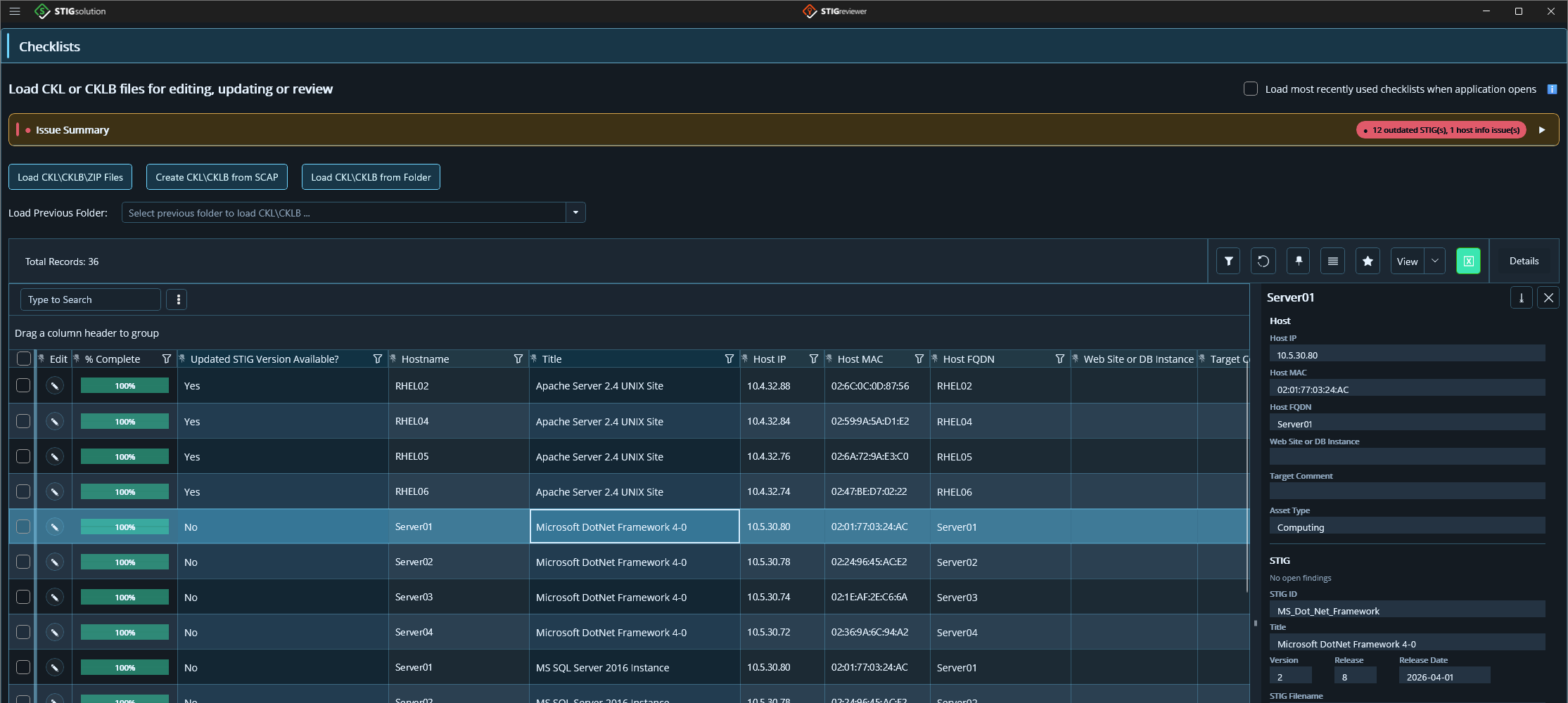
STIGreviewer, free
- The Issue Summary: outdated STIGs and host information problems across every checklist you have open.
- Every checklist flagged when a newer version of its STIG is available.
- Host details checked against your own rules, one click away.
Works with what you already have
- CKL
- CKLB
- SCAP
- .nessus
- ACAS
- eMASS POA&M
- eMASS TR Export
- Evaluate-STIG answer files
- Checklists on a single Windows server
- 6-12
- Checklists in a typical package
- Hundreds
The problem
Hundreds of checklists. Spreadsheets and scripts holding it together.
Everyone doing this work has built their own way through it: spreadsheets, PowerShell, Python, whatever could be cobbled together. It works, right up until it doesn’t.
It doesn’t scale
What handles 40 checklists fails at 400.
It takes a scripting skill set
The work ends up gated behind whoever on the team can write the scripts, and it leaves with them.
It isn’t a process
Nothing repeatable, nothing you can document, nothing you can hand to someone new.
How it goes wrong
The parts stop agreeing, and you have no way of knowing
The hardware and software list stops matching what was actually tested. The POA&M stops matching the results behind it. You find out when a reviewer does.
What it costs
Rework is the expensive part
A package that comes back isn’t a scheduling inconvenience. It’s re-testing, re-documenting, and re-submitting, while the ATO date moves and everyone waits on you.
The mistakes that cause it are rarely dramatic. A system in the baseline that never got tested. A POA&M entry that doesn’t match the finding it came from. A checklist still on last quarter’s version. Small, individually invisible, and expensive in aggregate.
Who we are
Built by people who do the work
STIG Solution builds applications for the people who assemble RMF packages, and we assemble them ourselves. Every one of our tools is written by someone who uses it, and that is what makes them good: they work the way the job actually runs, because we run it. Establish a baseline, test against it, prove the results agree, and keep the POA&M current.
We also publish quarterly STIG revision files, free to anyone who wants them: every new STIG compared against its previous version, with a change statement for each difference. We’ve done it every quarter for five years, and we’ll keep doing it whether you ever buy anything.
How it works
Three steps, at package scale
Build your baseline from what’s actually there
Your hardware and software list, and the test plan that covers it. NESSviewer builds the software list from what the scans actually found, so it reflects the systems rather than a spreadsheet somebody last touched a year ago.
Test against it
Checklists and scans across hundreds of assets, with bulk operations that scale instead of breaking.
Prove it holds together
Confirm everything in the baseline was tested, that the results agree, and keep your eMASS POA&M and Assessment Procedure (AP) results current from the actual results.
Products
One free. Two that run the package.
STIGreviewer
Replaces DISA STIG Viewer. Both CKL and CKLB in one application, a full inventory of your checklists, and version comparison against the current STIG library. No license key, no trial clock.
STIGrevolution
Bulk operations across hundreds of checklists, analysis and reporting across the whole set, and your eMASS POA&M and Assessment Procedure results kept in step with your testing. Windows.
NESSviewer
Executive summaries, per-asset software lists derived from plugin output, port and listener enumeration, and the baseline your software list feeds. Windows.
The baseline, and where it is today
Your hardware and software list and test plan, in one place, populated from real data rather than a spreadsheet. It ships in the NESSviewer beta now; STIGrevolution’s next release brings the same module, and the two will share one baseline.
Before you ask
Frequently asked questions
- Does my checklist or scan data leave my machine?
- No. You work on local copies, and none of our applications send checklist or scan data to us. The paid products make one outbound connection, for the license check.
- What network access do the applications need?
- STIGreviewer needs none. NESSviewer and STIGrevolution check their license with licensing.stigsolution.com over port 443, a service that runs in Microsoft Azure Government. The check carries your license key, a hashed computer ID, and the application version, never your data, and it picks up proxy settings automatically.
- Can I use them on a disconnected or air-gapped network?
- Yes. STIGreviewer works there with no setup, because it has no license check. NESSviewer and STIGrevolution are supported on disconnected, classified, and air-gapped networks too. They check their license online every 7 days and keep working for up to 14 days without a connection, so coordinate with us at mail@stigsolution.com and we will set up licensing for your environment.
- Do the applications use AI, and where does my data go?
- Only if you turn it on. Every AI feature stays hidden until you connect a provider: OpenAI, Azure OpenAI, Claude, or Ollama running on your own machine. Requests go to that provider under your own account. There is no STIG Solution AI service, nothing is routed through us, and with Ollama nothing leaves your computer.
- How are the applications installed?
- STIGreviewer installs from a signed MSIX on Windows and comes as a signed app on macOS, and the NESSviewer beta from a signed MSIX. NESSviewer’s current release and STIGrevolution come as a single-file EXE that runs without installing, or as an MSIX.
- Is STIGreviewer really free?
- Yes, permanently. There is no license key, no trial period, no activation, and no limit on the number of computers you install it on.
- How long is the free trial for the paid products?
- 14 days from activation for NESSviewer and STIGrevolution, with no license key needed to start.
- Are you affiliated with DISA?
- No. STIG Solution is an independent company, not affiliated with or endorsed by DISA or the Department of Defense. Our applications work with the file formats that DISA’s tools and eMASS use.
Quarterly STIG revision files, free
Every quarter we compare each new STIG against its previous version and write a change statement for every difference. Narrative fields go to AI with the old and new text, so the statement says what actually changed. JSON and Excel, and the JSON loads straight into our applications.
Your next package can go in clean
STIGreviewer is free, permanently: no key, nothing to activate, nothing phoning home. It’s a no-commitment way to see how our applications work. STIGrevolution and NESSviewer each come with a 14-day free trial.